Building a new docs site with RSC

As big fans of the dog fooding principle, we want to put RSC through its paces by using it to build more than just a demo app. As Redwood’s support for RSC becomes more mature we are going to need to document it with the same attention we pay to the existing Redwood docs. The current docs site is powered by Docusaurus. What if we built our own docs site to document RSC, using RSC? Docu-ception and docu-dog fooding rolled into one!

Enter Docwood, the codename for our RSC-powered documentation app.

Requirements

The list of our requirements we came up the project:

  1. Keep the docs in the existing redwoodjs/redwood repo, right alongside the code. This makes it super simple to write docs at the same time as code and a single PR merges everything at once.
  2. All docs are written in Markdown or MDX.
  3. The navigation structure and names of the docs should depend on the directory structure and content of the docs themselves (no separate config file to denote parent/child relationships or doc names).
  4. The app should feature real-world usage of RSC.
  5. Creating or modifying docs should not involve making any changes to the Docwood codebase itself.
  6. Creating or modifying docs should not require a re-deploy of the Docwood app.

#4 was the most nebulous requirement. What does “real-world usage” mean? After some discussion about what we wanted to highlight with RSC, we decided on the following:

  1. The docs site would be a real React app running in the browser (not just a statically generated site).
  2. Viewing a doc meant invoking the RSC flow to make a request to a server, where the Markdown would be complied and returned on fly.
  3. No pre-converted Markdown->HTML stored anywhere, no content stored in a database, no pre-processing of docs files at build time. However, Redwood’s service caching could be used, since we would still be performing a full RSC request and converting Markdown to HTML on the fly to populate the cache. (Service caching will be our recommended RSC performance-enhancement workflow—more delicious dog food!).

With those requirements in place, we got to work.
Techniques for Fetching Data: Comparing Next.js (app and pages API), Remix, and RedwoodJS

All SaaS applications involve CRUD – Creating, Reading, Updating, and Deleting.

Therefore, the way we fetch data naturally becomes a major piece of the developer experience and one of the many problems that a framework is able to solve.

Next.js app API, Next.js pages API, Remix, and RedwoodJS have all approached this problem differently, forming different opinions. Let’s look at each.

Next.js

Out of all the frameworks, Next.js offers the most options and flexibility when it comes to fetching data. The business goals for your application will determine which method you reach for. So, let’s approach it by looking at the problem you’re trying to solve.

Problem: Your pages don’t change very often. You want the fastest page load possible, with maximum SEO and OG Tag benefits.

I’d start by building static pages at build time. Next.js will try to deliver as much HTML and CSS to the browser as possible, resulting in snappy pages and happy Google crawlers.

Let’s look at some specific code examples.

First, it’s worth noting that these functions only work on the page level, when using the pages API.

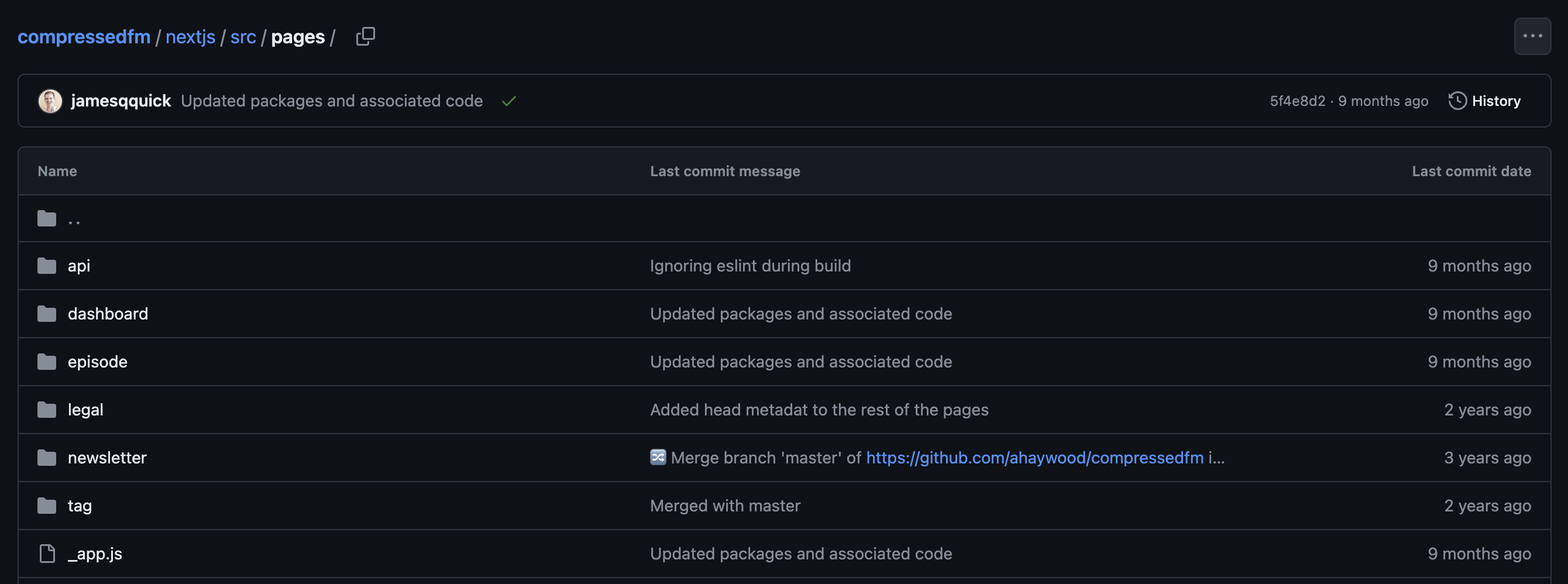
Screenshot of the pages directory within my Next.js application

Inside my pages/about.tsx file, I have some generic information for my podcast, Compressed.fm, that I want to display:

  • FAQs
  • Recommended episodes for getting started with our podcast
  • Our most popular episodes

We rarely update this information.

What’s Different? Comparing the Router in Next.js App API, Next.js Pages API, Remix, and RedwoodJS

Right now, there are a few key players in the React space: Next.jsRemix, and RedwoodJS.

If I stack them next to each other, there are a few key differences. It’s helpful to recognize these, so you can make informed decisions about the tooling and your developer experience.

Let’s start with the obvious, they’re all running React. I know some people want to equate Next.js with React, but they are two separate things. Historically, React is considered the frontend layer that provides REACTivity within the browser.

React aside, the key differences lie in the router and how we fetch and interact with data. – and that’s really all a framework is, right?! Delivering pages and serving data.

So, let’s break these down and look at specific code examples.

The Router

Next.js

Next.js has two different options, depending on whether you’re using the pages API or the app API.

The pages API is older, but is more stable and well documented.

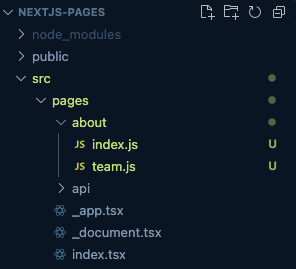
It uses a file based routing structure. Meaning, any file placed within the pages directory will get turned into a route. For example, pages/about.js gives you access to /about within the browser. If you want a “nested route,” such as /about/team, then you could simply add an about folder, with a team.js file inside.

Next.js Pages Router

In this example, I also moved about.js into the about folder and renamed the file to index.js. Both /pages/about.js and /pages/about/index.js resolve to /about

Fortnightly Newsletter

Pure information gold. No spam.

Intuit Mailchimp

Get a summary of what we’ve shipped, articles we’ve written, and upcoming events straight to your inbox, every two weeks.